
Bank Transfer
A bank transfer is a way to move money from one bank account to another electronically. A wire, bank, or credit transfer electronically transfers funds from one person or organization to another. A shopper can transfer cash between bank accounts or through a cash transfer at a cash office.
Bank transfer payment flow
A bank wire transfer works as follows:
- Initiation: The shopper chooses to pay via bank transfer.
- Payment instructions: The supplier provides the shopper with the supplier's bank details (IBAN, BIC/SWIFT codes), payment instructions, and settlement details.
- Shopper instructions: The shopper's bank initiates the transfer via a secure system (e.g., SWIFT, Fedwire) to the receiving bank. Funds are not instant and can take hours to days to process.
- Settlement: The issuing bank transfers funds to Reach, which then reports and remits them to the supplier.
Fees: Both sending and receiving banks may collect fees. The sending bank charges a separate fee, while receiving and intermediary banks deduct fees from the transferred amount, meaning the recipient receives less.
In general, the flow looks like this:
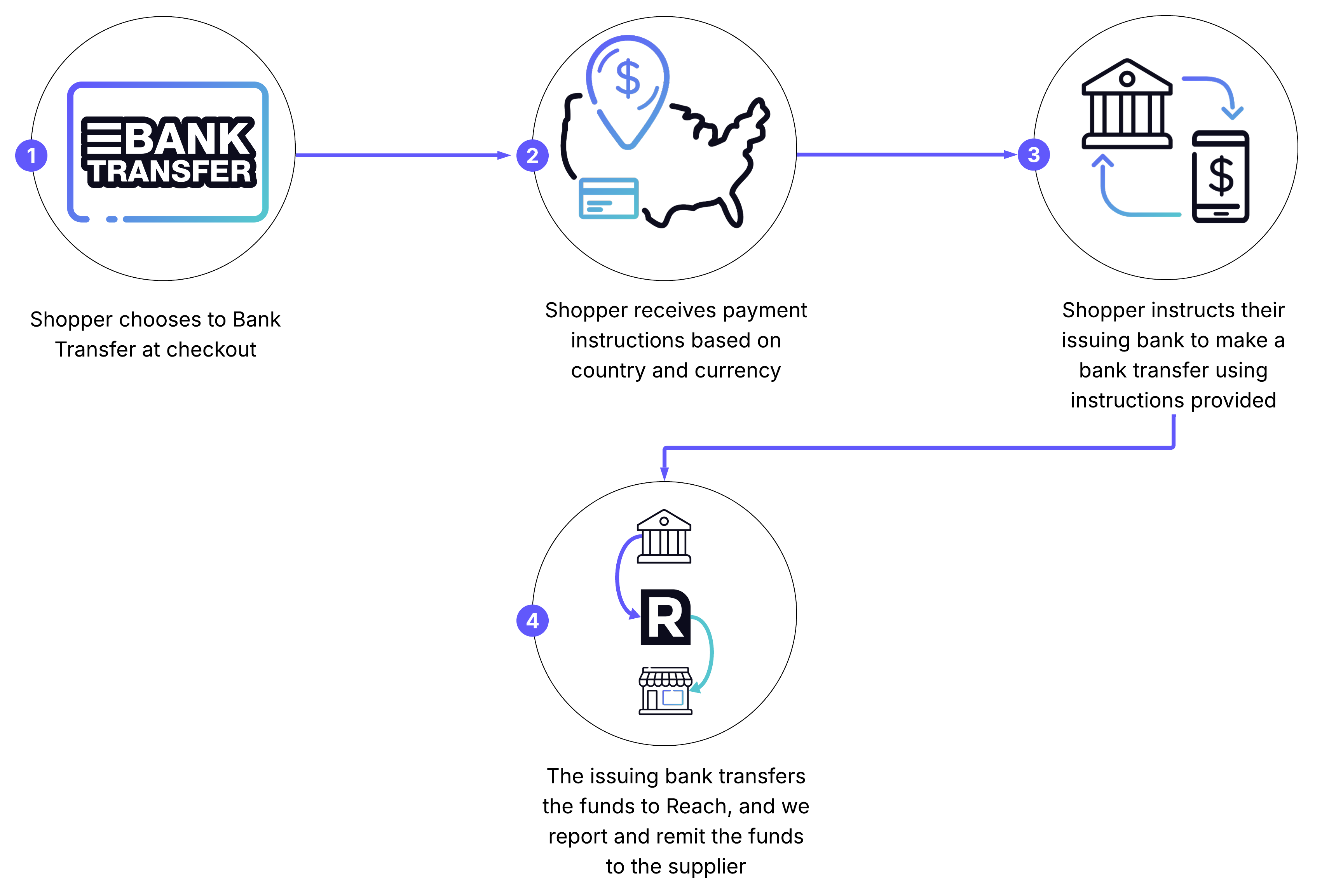
Bank transfer payment flow
If you are processing bank transfers locally, contact your account manager for a specific diagram.
Properties
Important considerations
-
Most international transfers use SWIFT, a global network for financial message exchange.
-
Each financial institution has an ISO 9362 BIC/SWIFT Code (typically eight characters, e.g., DEUTDEFF for Deutsche Bank in Frankfurt).
-
Extended 11 or 12-digit codes can direct payments to specific branches or offices.
Best practices
Send reminder emails to customers, as bank transfers are offline, and customers might forget to complete the transaction.
Payment timeline
The offline nature of bank transfers results in a highly variable payment timeline for customers. Payments could be completed the same day or take weeks. At Reach, orders are auto-canceled after 30 days of non-payment.
Technical considerations
- You only need to update the
IssuerIdfield in the API call for a wire transfer to change bank details. - Reach considers an order cancelled if it is not completed after 30 days due to the lack of a standard expiration for bank transfers.
Region or country-specific examples
This section provides examples of bank transfer checkout and response based on specific regions and countries, highlighting the variations in required information for different currencies and financial institutions.
If you have any questions regarding Bank Transfer, contact your Reach representative.
Enhanced bank transfer checkout and response example
The enhanced Bank Transfer checkout includes additional variables based on each region. These variables appear in the Display object in the [/checkout](https://docs.withreach.com/reference/checkout) response. While confirming the new integration, you must present the entire Display object to the customer.
{
  "MerchantId": "e78e8cd0-24b8-4b0c-a922-87a1d8cc61c3",
  "ReferenceId": "1540602981444",
  "PaymentMethod": "BANK",
  "ConsumerCurrency": "EUR",
  "Capture": true,
  "Items": [
    {
      "Description": "Piston Ring",
      "ConsumerPrice": 100,
      "Quantity": 1,
      "Sku": "4383471583721"
    }
  ],
  "Consumer": {
    "Name": "Jane Doe",
    "Email": "[email protected]",
    "Phone": "1234567890",
    "Address": "123 Any Street",
    "City": "Somewhere",
    "Region": "14",
    "PostalCode": "12345",
    "Country": "BE",
    "NationalIdentifier": "00003456790"
  },
  "DeviceFingerprint": "a5772185-1c9a-4646-9772-557fc6083ea2",
  "Return": "https://checkout-sandbox.gointerpay.net/return.php"
}
{
"OrderId": "54e8e92d-2ba0-4a56-8da5-ec60d1cf6449",
"UnderReview": false,
"Expiry": "2018-11-13T01:14:25Z",
"Authorized": false,
"Completed": false,
"Captured": false,
"Action": {
"Display": {
"accountHolder": "<accountHolderName>",
"accountNumber": "<accountNumber>",
"bankName": "<bankName>",
"city": "Amsterdam",
"country": "Netherlands",
"extraBankData": "<extraBankData>",
"iban": "<iban>",
"paymentReference": <bankName>,
"swiftCode": "<swiftCode>"
}
}
}These changes appear in the /checkout response for the EUR, GBP, and USD currencies.
EUR
{
  "OrderId": "54e8e92d-2ba0-4a56-8da5-ec60d1cf6449",
  "UnderReview": false,
  "Expiry": "2018-11-13T01:14:25Z",
  "Authorized": false,
  "Completed": false,
  "Captured": false,
  "Action": {
    "Display": {
      "accountHolder": "<accountHolderName>",
      "accountNumber": "<accountNumber>",
      "country": "BE",
      "iban": "<iban>",
      "paymentReference": "<paymentReference>",
      "swiftCode": "<swiftCode>"
    }
  }
}
GBP
{
  "OrderId": "54e8e92d-2ba0-4a56-8da5-ec60d1cf6449",
  "UnderReview": false,
  "Expiry": "2018-11-13T01:14:25Z",
  "Authorized": false,
  "Completed": false,
  "Captured": false,
  "Action": {
    "Display": {
      "accountHolder": "<accountHolderName>",
      "accountNumber": <accountNumber>,
      "paymentReference": "<paymentReference>",
      "sortCode": <sortCode>
    }
  }
}
USD
{
  "OrderId": "54e8e92d-2ba0-4a56-8da5-ec60d1cf6449",
  "UnderReview": false,
  "Expiry": "2018-11-13T01:14:25Z",
  "Authorized": false,
  "Completed": false,
  "Captured": false,
  "Action": {
    "Display": {
      "abaRoutingNumber": <abaRoutingNumber>,
      "accountNumber": <accountNumber>,
      "bankName": "<bankName>",
      "paymentReference": "<paymentReference>",
      "swiftCode": "<swiftCode>"
    }
  }
}
Updated 7 months ago