
OXXO

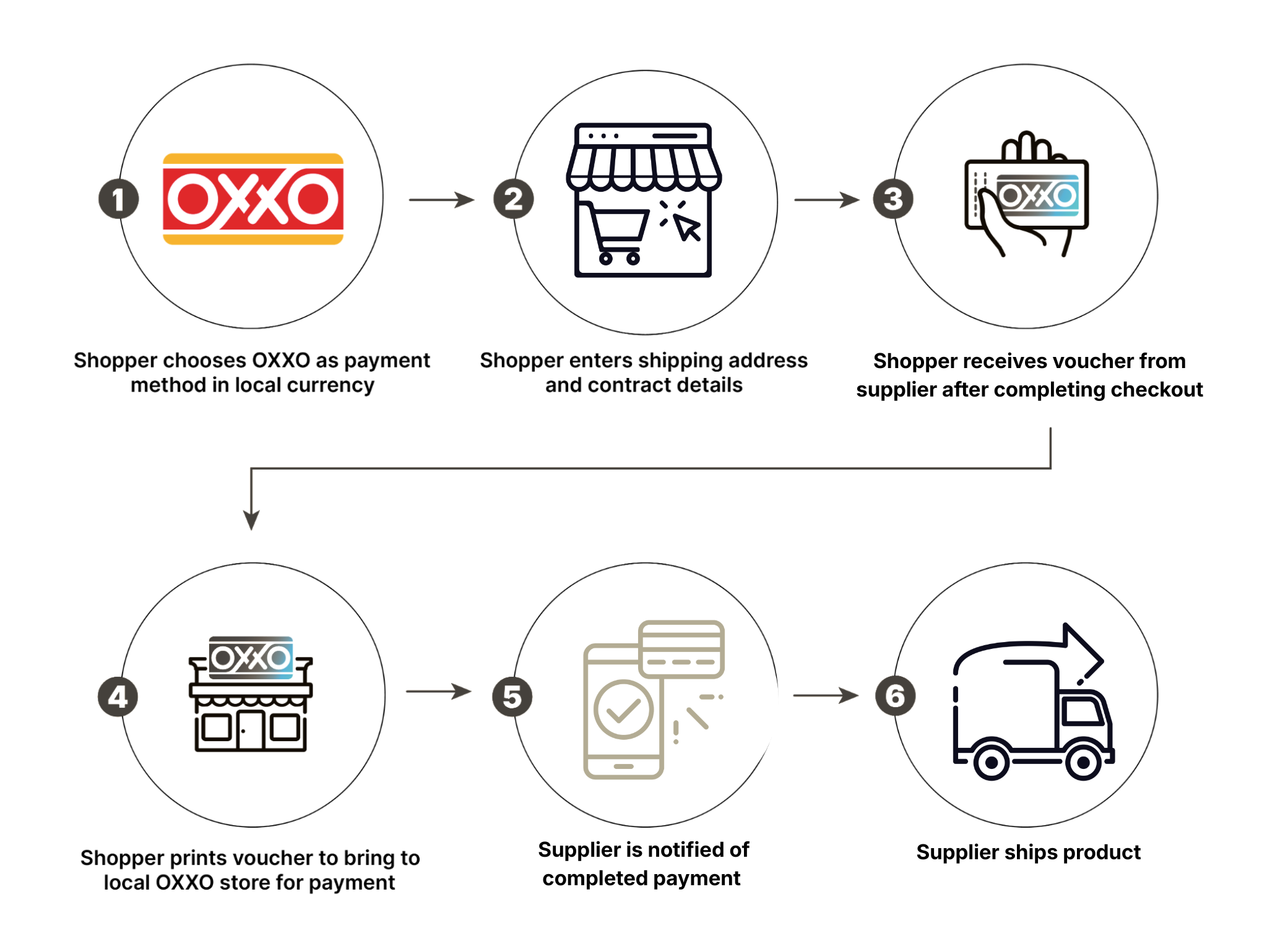
OXXO is a chain of convenience stores that offers alternative cash payments in Mexico. After choosing the OXXO payment method at an online marketplace, shoppers can pay at their local OXXO store. OXXO holds a large market share in Mexico, with over a third of online payments processed through its network.
OXXO payment flow
Here's an example of what Oxxo might look like online:
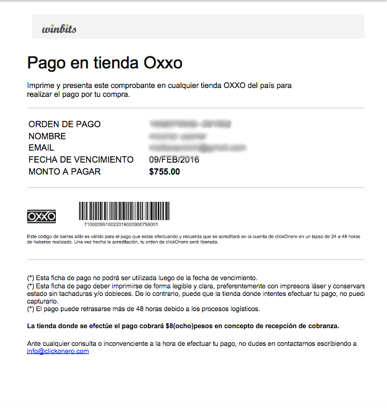
OXXO example
Conceptual overview
The following video shows how a supplier, Nippon-Yasan, integrated OXXO into their checkout process.
We always recommend using the correct RFC for your shopper.
Properties
Important considerations
Consumer information in Mexico must include either the RFC, or CURP, or IFE in the NationalIdentifier field.
The maximum transaction amount for OXXO in Mexico is MXN 10.000.
Because shoppers can pay the OXXO voucher at a physical store, there is often a lag of multiple days between the order being placed and the order being paid. Remember to wait until payment is made before shipping any physical goods.
Cancelling an OXXO order
If you cancel an order, it's best to contact the customer immediately and let them know. If you cancel an OXXO order while it's pending, the customer will not know it was canceled. As such, they may pay for that slip and wait for the order to arrive, but it never will.
"Authorize" and "Capture" are irrelevant to the OXXO payment process. OXXOs can't be "Cancelled," either. They can be paid or unpaid.
It is possible to cancel an offline order only if the shopper has not yet redirected through the Reach system to see the ticket. Once the customer sees the ticket, there is no way to cancel the order, as the customer may pay the voucher at any time.
Technical considerations
You may include either the RFC, or CURP, or IFE in the NationalIdentifier field as part of the consumer information.
Mexican addresses must include a ZIP code, and use the abbreviation code for the state below:
| Abbreviation | State | Abbreviation | State |
|---|---|---|---|
| AGS | Aguascalientes | MOR | Morelos |
| BC | Baja California | NAY | Nayarit |
| BCS | Baja California Sur | NL | Nuevo Leon |
| CAM | Campeche | OAX | Oaxaca |
| COA | Coahuila | PEU | Puebla |
| COL | Colima | QRO | Queretaro |
| CHS | Chiapas | ROO | Quintana Roo |
| CHI | Chihuahua | SLP | San Luis Potosi |
| DF | Distrito Federal | SIN | Sinaloa |
| DGO | Durango | SON | Sonora |
| GTO | Guanajuato | TAB | Tabasco |
| GRO | Guerrero | TAM | Tamaulipas |
| HGO | Hidalgo | TLA | Tlaxcala |
| JAL | Jalisco | VER | Veracruz |
| MEX | Mexico | YUC | Yucatan |
| MIC | Michoacan | ZAC | Zacatecas |
{
  "MerchantId": "e78e8cd0-24b8-4b0c-a922-87a1d8cc61c3",
  "ReferenceId": "1540602856312",
  "PaymentMethod": "OXXO",
  "ConsumerCurrency": "MXN",
  "Capture": true,
  "Items": [
    {
      "Description": "Piston Ring",
      "ConsumerPrice": 100,
      "Quantity": 1,
      "Sku": "4383471583721"
    }
  ],
  "Consumer": {
    "Name": "Jane Doe",
    "Email": "[email protected]",
    "Phone": "1234567890",
    "Address": "123 Any Street",
    "City": "Somewhere",
    "Region": "14",
    "PostalCode": "12345",
    "Country": "MX",
    "NationalIdentifier": "00003456790"
  },
  "DeviceFingerprint": "a5772185-1c9a-4646-9772-557fc6083ea2",
  "Return": "https://checkout-sandbox.gointerpay.net/return.php"
}
{
"OrderId": "b5a210dd-7465-459f-93fb-032712def3fe",
"UnderReview": false,
"Expiry": "2018-11-07T01:13:22Z",
"Authorized": false,
"Completed": false,
"Captured": false,
"Action": {
"Redirect": "https://sandbox.gointerpay.net/auth/52ee3ba0-4d76-47f9-8634-435644514755"
}
}Testing
Because OXXO is an offline payment method, testing is a manual process. As you go through test transactions in the sandbox, contact support when you're ready for instructions on manually advancing the transaction to your desired stage.
Contact the Reach support team to test expiration, and we can manually expire the order.
Updated 7 months ago