
Reach Tax Quote API
Understand the Tax Quote API's flow and integration
Suppliers using Reach's Checkout API or Drop-In integration can call the Tax Quote API to calculate a tax amount for a given order and receive a TaxQuoteId.
TheTaxQuoteId allows Reach to identify and withhold the tax amount owed to the tax jurisdiction from the total transaction amount paid by the customer. The tax amount is later remitted to the relevant tax jurisdiction.
Please view the Reach Tax Quote API specification for further details.
Exclusive tax flow
This example follows an exclusive tax flow. For more details on inclusive tax, please review the Inclusive and exclusive tax section.
Call the Tax Quote API
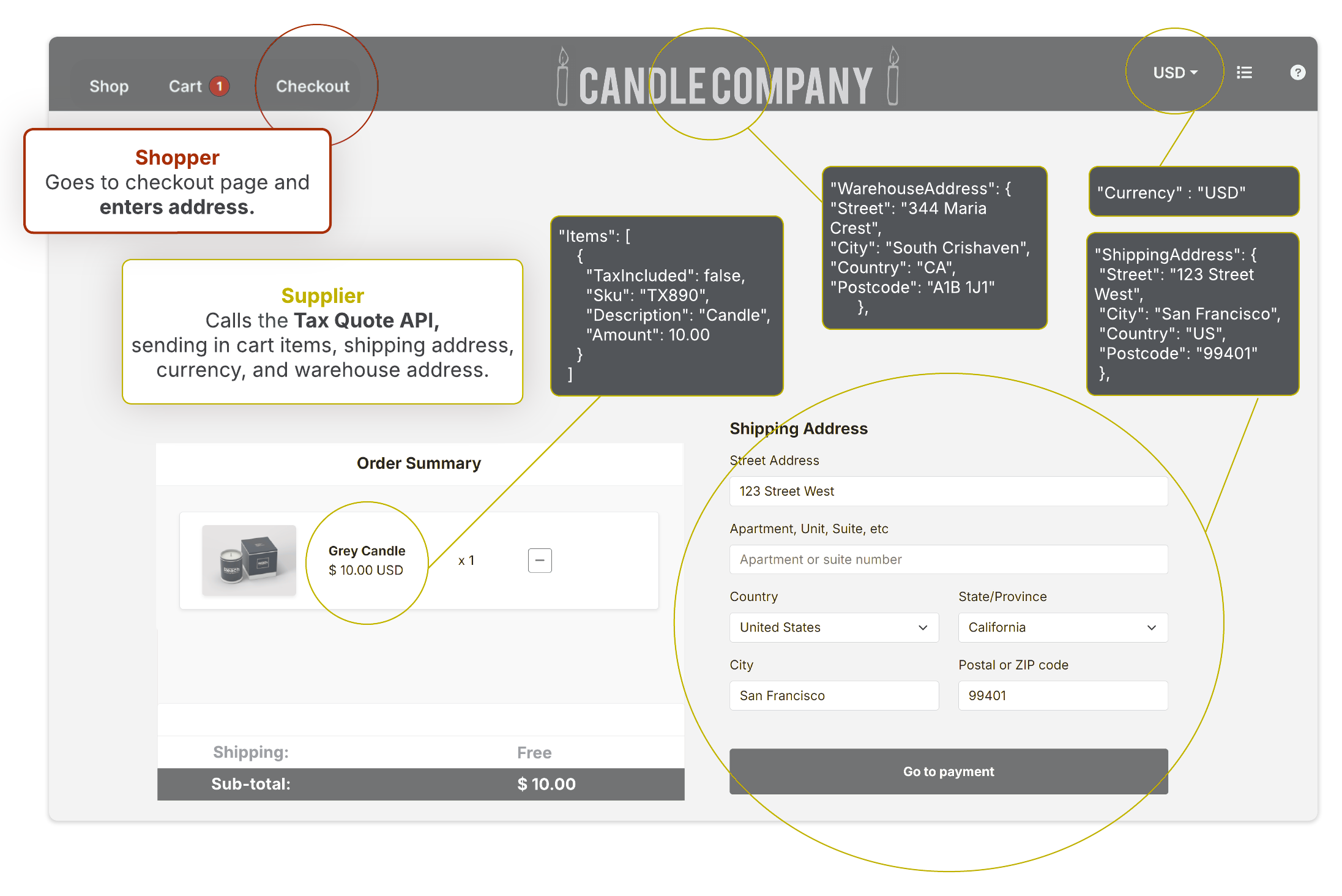
When the shopper navigates to the checkout page and enters their shipping address, the supplier calls the Tax Quote API. The customer's shipping address, currency, and cart items are used to determine the tax type and rate
If you are selling a physical good, your warehouse address is also required for an accurate tax calculation.
Display the tax amount
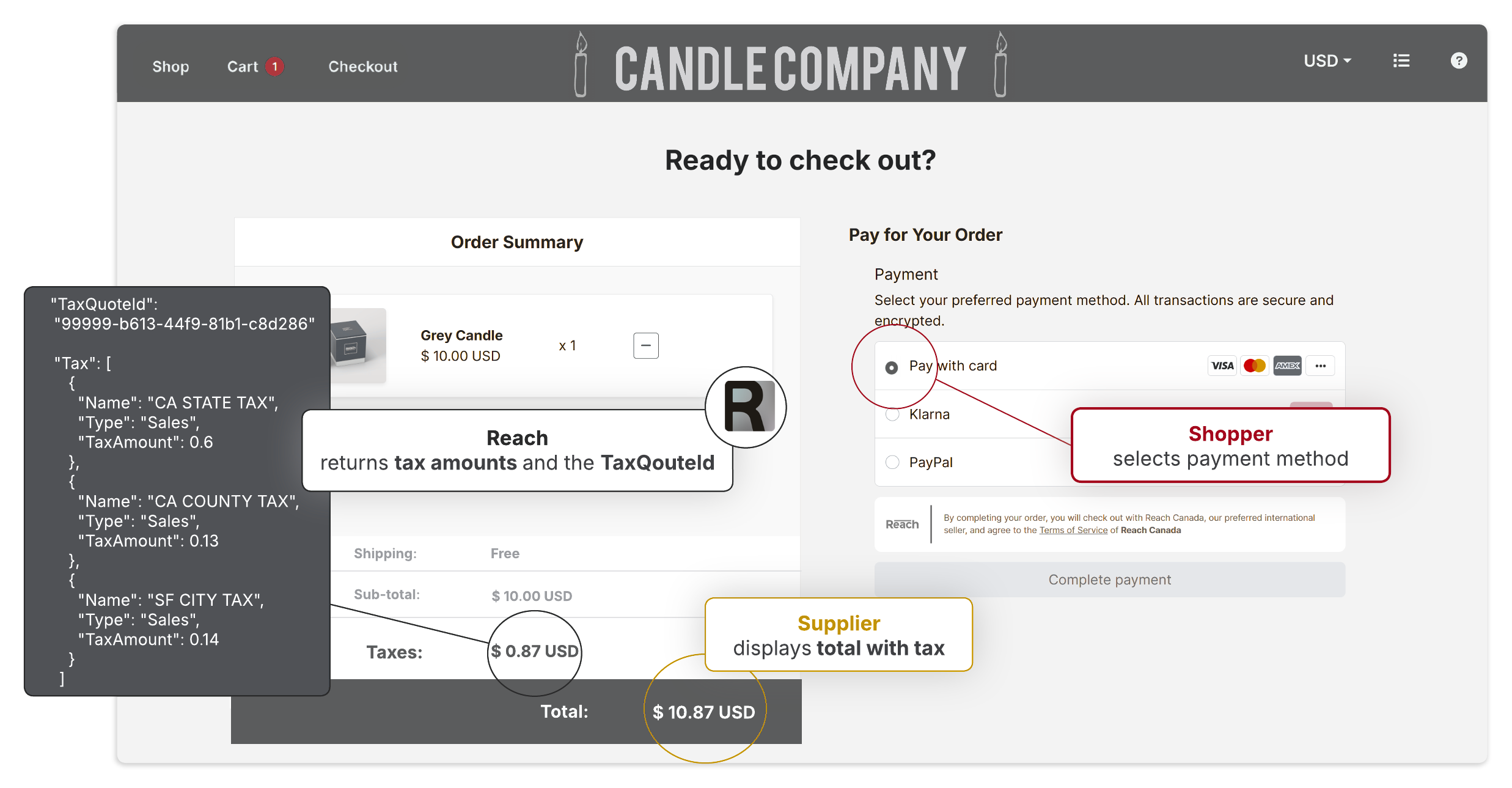
The Tax Quote API applies the tax rate to the item amount to determine the tax amount. It returns the tax amount to the supplier's site for display to the customer at checkout.
Tax details, including the tax type and tax code, are also returned. At the same time, the Tax Quote API creates a TaxQuoteId for the order.
Collect payment
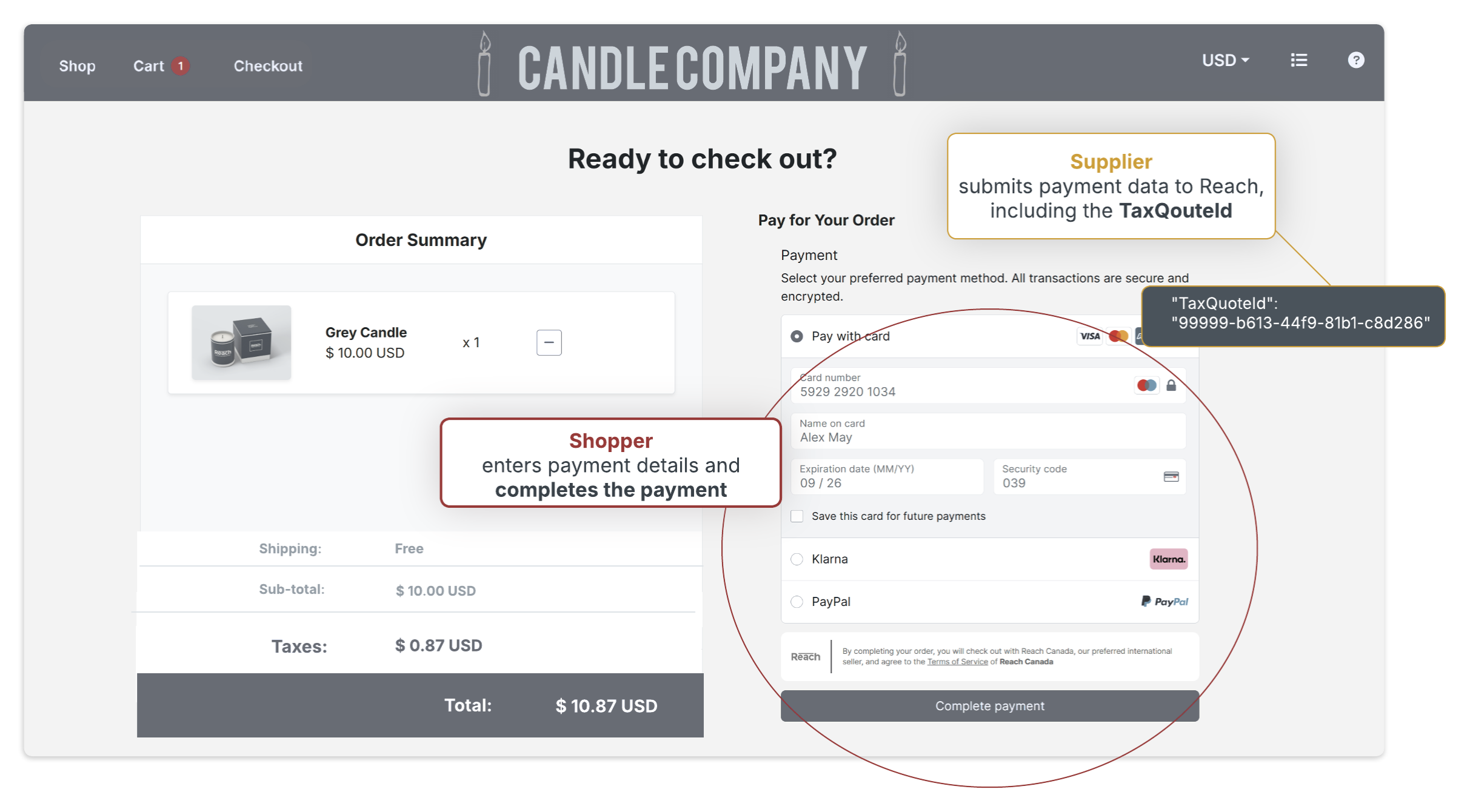
The shopper enters their payment details and completes the payment.
To create a transaction in Reach's system, the supplier submits the order information and payment details via either the Checkout API or the Drop-In API, depending on their integration. The supplier sends the TaxQuoteId to Reach in the same request payload along with the total amount, including tax.
Once the order is complete and authorized, Reach will manage all aspects of the transaction, including tax remittance and filing.
Tax Quote API request examples
Below are examples of potential requests. The minimum tax quote request contains only the required fields. The full tax quote with tax included example shows a request using inclusive tax (the other examples show exclusive tax).
curl --location 'https://api.sandbox.withreach.com/v1/tax/quote' \
--header 'Content-Type: application/json' \
--header 'Authorization: Basic cGF5c3RhY2s6WUlFO1BqOC1td0xjWHduVU4=' \
--data '{
    "Reference": "c43149ae-764a-4147-8bf2-cf574f5d5deb",
    "Currency": "CAD",
    "Items": [
        {
            "Amount": 45.9,
            "Sku": "SKU-1"
        }
    ],
    "ShippingAddress": {
        "Street": "86170 Mayer Ford",
        "City": "Micahfort",
        "Country": "CA",
    }
}
curl --location 'https://api.sandbox.withreach.com/v1/tax/quote' \
--header 'Content-Type: application/json' \
--header 'Authorization: Basic cGF5c3RhY2s6WUlFO1BqOC1td0xjWHduVU4=' \
--data '{
"Reference": "9363c37a-2eb3-4040-92b1-6414e3869b78",
"Currency": "CAD",
"BusinessIdentifier": {
"Type": "GST",
"Number": "12345678"
},
"Items": [
{
"Amount": 10.1,
"Sku": "SKU-1",
"Name": "Pen",
"Description": "Blue ballpoint pen",
"Discounted": false,
"TaxIncluded": false
}
],
"WarehouseAddress": {
"Street": "344 Maria Crest",
"City": "South Crishaven",
"Region": "NL",
"Country": "CA",
"Postcode": "A1B 1J1"
},
"ShippingAddress": {
"Street": "86170 Mayer Ford",
"City": "Micahfort",
"Region": "NS",
"Country": "CA",
"Postcode": "E4L 0R6"
},
"Meta": {
"Field1": "Meta Data",
"Field2": "1234567890"
}
}curl --location 'https://api.sandbox.withreach.com/v1/tax/quote' \
--header 'Content-Type: application/json' \
--header 'Authorization: Basic cGF5c3RhY2s6WUlFO1BqOC1td0xjWHduVU4=' \
--data '{
"Reference": "f72a91-93n-393",
"Currency": "GBP",
"BusinessIdentifier": {
"Type": "GST",
"Number": "238404099"
},
"Items": [
{
"Amount": 45.9,
"Sku": "AB89",
"Name": "Glass",
"Description": "wine glass",
"Discounted": false,
"TaxIncluded": true
}
],
"WarehouseAddress": {
"Street": "22 Baker Way",
"City": "London",
"Region": "NW",
"Country": "UK",
"Postcode": "U7B 5B9"
},
"ShippingAddress": {
"Street": "64 Walker Street",
"City": "Theraby",
"Region": "PE",
"Country": "CA",
"Postcode": "Y1B 5B9"
},
"Meta": {
"Field1": "test",
"Field2": "test"
}
}curl --location 'https://api.sandbox.withreach.com/v1/tax/quote' \
--header 'Content-Type: application/json' \
--header 'Authorization: Basic cGF5c3RhY2s6WUlFO1BqOC1td0xjWHduVU4=' \
--data '{
"Reference": "6acb36f2-547e-4dfd-b566-b3a3e20d4c01",
"Currency": "CAD",
"BusinessIdentifier": {
"Type": "GST",
"Number": "380202"
},
"Items": [
{
"Amount": 45.9,
"Sku": "Test",
"Name": "Test",
"Description": "Test",
"Discounted": true,
"TaxIncluded": false
}
],
"ShippingFromAddress": {
"Street": "344 Maria Crest",
"City": "South Crishaven",
"Region": "NL",
"Country": "CA",
"Postcode": "A1B 1J1"
},
"ShippingAddress": {
"Street": "86170 Mayer Ford",
"City": "Micahfort",
"Region": "NS",
"Country": "CA",
"Postcode": "E4L 0R6"
},
"Meta": {
"Field1": "test",
"Field2": "test"
},
"Discounts":[
{
"Name": "Discount 1",
"Amount": 10.00
}
]
}Integration
The Tax Quote API uses Basic Authentication, standard HTTP methods, and JSON payloads. Its payload is lightweight; at a minimum, the currency, reference (your unique ID), item details, and shipping address are required.
Attention should be paid to the quality of the address data, as the API may return a 400 Bad Request error or an inaccurate tax rate if the address is incorrect or invalid. Ensure your site's address form is well-formatted with comprehensive field validation.
As the TaxQuoteId is needed for the subsequent Checkout or Session API call, it is necessary to maintain state to ensure the ID persists until the transaction is finalized.
If the cart is modified at any point, you will need to call the Tax Quote API again to retrieve updated tax amounts.
Inclusive and exclusive tax
The TaxIncluded parameter
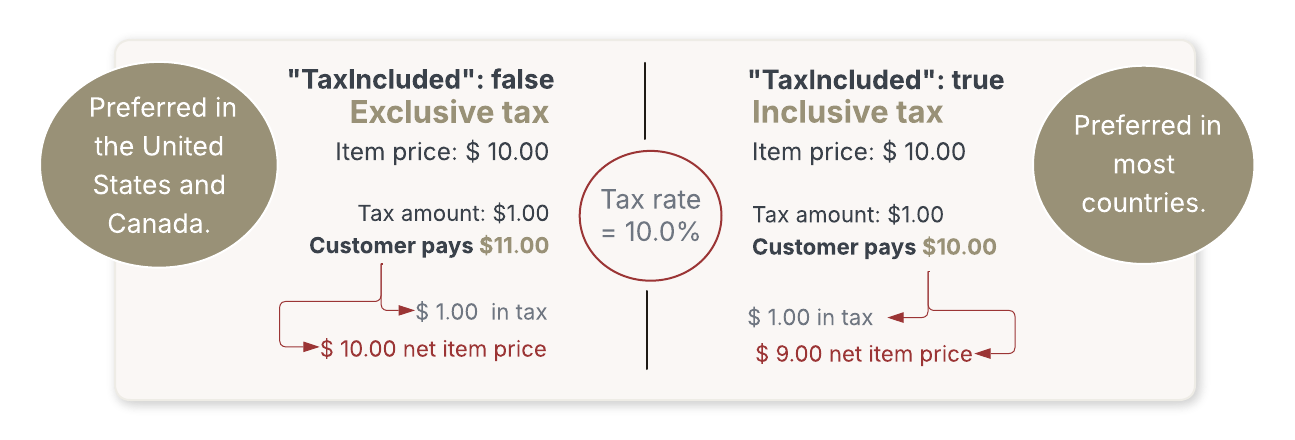
TaxIncluded parameterInclusive tax means the tax amount is included in the item amount, while exclusive tax shows the tax as a separate line item. The Tax Quote API handles both tax exclusive and inclusive tax using a boolean flag—TaxIncluded.
The TaxIncluded parameter is included in the items array when making a request to the Tax Quote API. It is an optional field.
- If
"TaxIncluded": false, tax will be calculated and added to the item's price. - If
"TaxIncluded": true, tax will be calculated based on the item's net price.
Refunds
Refunds can be managed in the Reach Admin Portal. Review the Refund section to learn more.
For suppliers using the Drop-In integration, you can use the Order API to issue a refund against an order. The order ID, reference ID, and the transaction total, including the tax amount, are required to create a refund.
curl --request POST \
     --url https://api.sandbox.withreach.com/v1/orders/OrderId/refunds \
     --header 'accept: application/json' \
     --header 'content-type: application/json' \
     --data '
{
  "RefundReference": "YourUniqueReference",
  "Amount": 1.23
}
'
For suppliers using the Checkout API, refunds can be created using the /refund API endpoint. The order ID and the items you are refunding are required, including SKUs, item prices (including taxes), and quantities.
curl --request POST \
     --url https://checkout.rch.how/v2.22/refund \
     --header 'accept: x-www-form-urlencoded' \
     --header 'content-type: application/x-www-form-urlencoded' \
     --data 'request={"MerchantId":"3fa85f64-5717-4562-b3fc-2c963f66afa6","OrderId":"3fa85f64-5717-4562-b3fc-2c963f66afa6","ReferenceId":"string","Amount":0,"Items":[{"Sku":"string","ConsumerPrice":0,"Quantity":0}]}' \
     --data signature=string
The item total and the tax are returned to the customer. Partial refunds can be processed via the Order API and the Checkout API by specifying only the items to be refunded.
You will receive a successful response after the request is made. This does not mean the refund has been successful; it only means it has been added to the system and will be attempted. After the attempt, you will receive a notification indicating whether the refund was successful.
Updated 25 days ago