
Transactions
Review your recent transaction activity
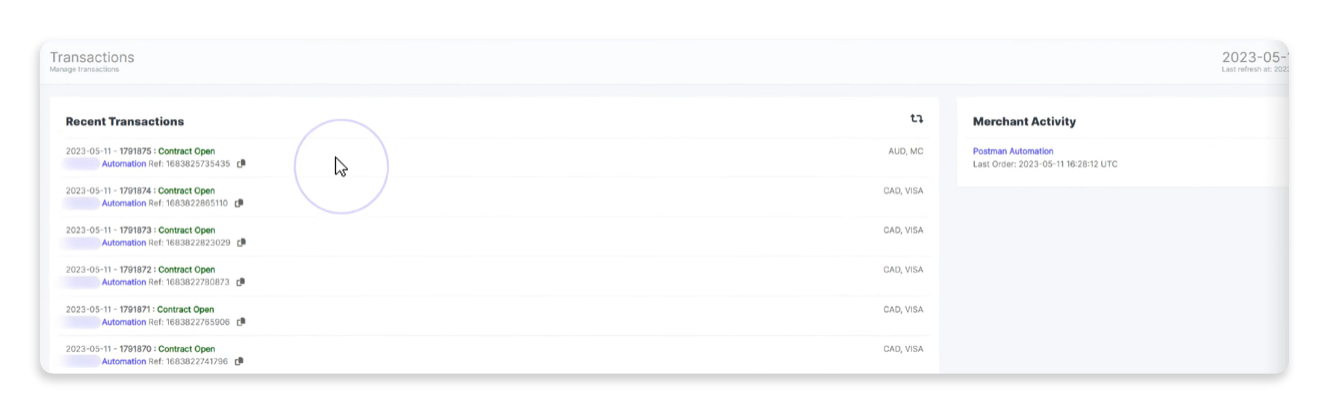
The Transactions section provides a snapshot of transaction activity, broken down into easy-to-navigate tabs. At a glance, you can review pertinent information about your store's activity and configuration.
Recent transactions and supplier activity
The Recent Transactions pane shows your store's recent transactions, and the Merchant Activity pane shows your store's recent activity.
Actions
You can perform the following actions on the Recent Transactions and Merchant Activity panes and related windows:
- Click the Refresh
 icon to refresh the transactions, supplier activity, or payment details.
 - Click a transaction's row under the Recent Transactions pane to view its payment details. The Payment Details window shows the related payment information.
- To view the transaction's details related to your store, click your account name in the transaction's row under Recent Transactions or your account's store name under Merchant Activity. The
<your_store_name>Details window shows the related transaction information. - To copy a reference ID or order ID, click the Copy
 icon next to the ID and paste the text to a safe location.
Payment Details
The Payment Details window displays the payment information related to a transaction. To view a transaction's information, click on the relevant transaction row under Recent Transactions to open the Payment Details window.

The window includes a subset of the following tabs:
| Tab | Description |
|---|---|
| Summary | This tab provides an overview of the transaction and its corresponding financial details. |
| Review | This tab displays review details. You can perform the following tasks on this tab:
|
| Related | This tab displays related transactions. |
| Contract | This tab displays any contracts associated with the transaction. |
| Refunds | The tab displays any refunds associated with the transaction. To add a refund to the transaction, click Add New Refund. |
| Timeline | The tab provides the transaction timeline as it moves through the transaction states and the JSON response associated with a transaction state when applicable. |
| Notes | This tab displays any notes associated with the transaction. To add a note, enter your note in the text field and click Add New Note. If there are multiple notes, click Oldest First? to sort the notes from oldest to newest. |
<your_store_name> Details
<your_store_name> DetailsThe <your_store_name> Details window displays activity associated with your store. It includes a subset of the following tabs:
| Tab | Description |
|---|---|
| Attributes | This tab displays the store's attributes and payment methods. |
| FX Rates/Markup | This tab shows which currencies Reach processes, their corresponding markup, and the current rate offers. |
Transaction states
The following table describes each transaction state:
| Transaction state | Description |
|---|---|
AuthenticationPending | This state refers to offline transactions only. Reach redirected the shopper to the third-party and/or provided the necessary information for the shopper to pay offline, but Reach has not yet received the payment. |
AuthenticationRequired | The shopper needs to authenticate with the third-party, such as PayPal, or obtain information from a third-party service, such as Boleto, on how to pay offline. |
Authorized | The payment card or account has been authorized for the requested amount of the order. |
AuthorizationFailed | The payment card or account could not be authorized for the requested amount of the order. This typically occurs because the card issuer or account provider has rejected the transaction, or the user has canceled the transaction on the payment site. |
CancelPending | This state precedes Cancelled. The cancellation request has been sent, and we are not awaiting a response. |
Cancelled | The supplier cancelled payment on behalf of the customer using the /cancel request, or the order was authorized but never captured, and the authorization has expired, resulting in the cancellation of the transaction. |
CommitAccepted | The receiving party has received the Capture request. |
CommitPending | A request has been sent to confirm the order and capture funds from the shopper's selected payment method (e.g., a request is sent to the acquiring bank to capture funds from the issuing bank) |
Completed | Reach captured the transaction and settled the foreign exchange with the customer's bank, marking the final transaction status. |
Created | Reach has received a request. This is the first status for all orders. |
PaymentFailed | The receiving party did not accept the Capture request, or we received a Not Ok response. |
PaymentProcessed | Reach captured the transaction, but is still settling the foreign exchange with the customer's bank. |
Rejected | The order has been cancelled due to suspected fraud. |
Updated 7 months ago