
Reach data share
Access your report data through Snowflake data sharing
The Reach data share uses Snowflake-native sharing to provide a direct, secure connection to your data. The data share works alongside your Reach reports to present a comprehensive view of your transactions and adjustments.
Data share options
Currently, two methods are available. Regardless of the chosen method, you can select which of the six core datasets you would like to receive.
Snowflake share
Available nowIf your organization already uses Snowflake, this is the recommended path. Reach creates a dedicated share scoped to your Snowflake account identifier. You mount it as a database and query it as you would any other Snowflake database.
Reach automatically determines whether to use a direct share (same cloud and region as Reach) or a private listing (cross-cloud or cross-region) based on the account details you provide.
For those using a direct share, data freshness is live; for those using a private listing, it is approximately 10 minutes.
Cloud storage file drop
Available soonIf you use cloud storage (such as Azure or AWS) but not Snowflake, Reach will write daily CSV files directly into your bucket or container. A scheduled automation drops the files into your cloud storage location at the same time each day.
Cloud storage file drop is not yet available. Express your interest and your Reach representative can notify you when the option opens.
Snowflake reader account
Available on requestIf your organization does not use Snowflake and has no cloud storage infrastructure, we can offer a Reach-managed account to access your reporting data. To query your data, simply log in to the provided account.
Reader accounts are available upon request. Contact your Reach representative to discuss eligibility.
Request a data share
To request a data share, complete the following steps and contact your Reach representative to begin the setup process.
Choose your datasets
Choose any number of the six datasets. You can add additional datasets at any time by contacting your Reach representative.
Choose your delivery method
Review which delivery method fits your infrastructure
Gather the details for your chosen delivery method
Collect the requisite information. See the table below for details.
Send the details to your Reach representative
Use the request template below, or provide the information in your preferred format.
Depending on the chosen method, the setup process can be completed within the same day as the request.
Required information by delivery method
Each method requires slightly different information to begin the setup process. In your initial request, include the correct information for your chosen method.
Query for Snowflake share setup
If you are using a Snowflake share, identify your Snowflake account by running the following query in your Snowflake account.
Include the output in your initial request to your Reach representative.
SELECT
CURRENT_ORGANIZATION_NAME() || '.' || CURRENT_ACCOUNT_NAME() AS ORG_ACCOUNT,
CURRENT_ACCOUNT() AS ACCOUNT_LOCATOR,
CURRENT_REGION() AS REGION;
Request template
You may use the following templates to make your request.
Select the delivery method tab that suits your business for the corresponding request template:
Snowflake share request template
===============================================================================
Supplier name:
Contact email(s):

── Datasets (select all that apply) ──────────────────────────
[ ] TRANSACTIONS
[ ] ORDER_DETAILS
[ ] CHARGEBACKS
[ ] PAYMENT_METHOD_DETAILS
[ ] PERSONS
[ ] SETTLEMENT_DETAILS

── Delivery method ───────────────────────────────────────────
[ ] Snowflake share / private listing   ← available now
[ ] Snowflake reader account            ← on request
[ ] Cloud storage file drop             ← not yet available, indicate interest

── Snowflake share / private listing ──────────────────────
  Run this in your Snowflake account and share the output in the fields below:

  SELECT
    CURRENT_ORGANIZATION_NAME() || '.' || CURRENT_ACCOUNT_NAME() AS ORG_ACCOUNT,
    CURRENT_ACCOUNT() AS ACCOUNT_LOCATOR,
    CURRENT_REGION()  AS REGION;

ORG_ACCOUNT    :
ACCOUNT_LOCATOR:
REGION         :
Cloud storage file drop request template
===============================================================================
Supplier name:
Contact email(s):
── Delivery method ───────────────────────────────────────────
[ ] Cloud storage file drop ← not yet available, indicate interest
── Datasets ──────────────────────────
Select all that apply:
[ ] TRANSACTIONS
[ ] ORDER_DETAILS
[ ] CHARGEBACKS
[ ] PAYMENT_METHOD_DETAILS
[ ] PERSONS
[ ] SETTLEMENT_DETAILS
── Required information ──────────────────────
Requires a conversation with your team and ours to determine best configuration. Further requirements to be added when option is available.Snowflake reader account request template
===============================================================================
Supplier name:
Requester email:
── Chosen delivery method ───────────────────────────────────────────
[x] Snowflake reader account ← on request
── Datasets ──────────────────────────
Select all that apply:
[ ] TRANSACTIONS
[ ] ORDER_DETAILS
[ ] CHARGEBACKS
[ ] PAYMENT_METHOD_DETAILS
[ ] PERSONS
[ ] SETTLEMENT_DETAILS
── Required information ──────────────────────
A contact email address for the account login :Datasets
Suppliers may select any of the six available datasets for their data share:
- CHARGEBACKS — dispute records
- ORDER_DETAILS — line-item detail for each order
- PAYMENT_METHOD_DETAILS — card and payment instrument attributes
- PERSONS — consumer and consignee personally identifiable information (PII)
- SETTLEMENT_DETAILS — settlement line-items
- TRANSACTIONS — core transaction data
The following tables document the available columns in each dataset. All timestamps are in UTC. Monetary amounts are in the currency specified by the accompanying currency column.
Chargebacks dataset
One row per chargeback. Includes chargeback amount, currency, reason, submission date, and outcome (e.g., won or lost).
Order details dataset
One order per line item. Includes SKUs, quantities, consumer prices, and currency per line item for each order.
Payment method details dataset
Includes BIN, expiry, issuing country, card type, and account identifier data for payment methods used in your transactions.
Persons dataset
Consumer and consignee PII— data regarding your consumers, including: names, billing and shipping addresses, emails, and phone numbers.
Joined to the transactions table via CONSUMER_PERSON_ID and CONSIGNEE_PERSON_ID.
Settlement details dataset
Settlement lines items—sale, refund, chargeback, and fee line types with gross, fee, and net amounts in settlement currency.
Transaction dataset
The core table for transaction data. One row per transaction. Includes amounts, currencies, payment method, state, timestamps, risk signals, and FX breakdown.
Join key reference
The six datasets form a star schema centered on TRANSACTIONS. The diagram below shows the join keys.
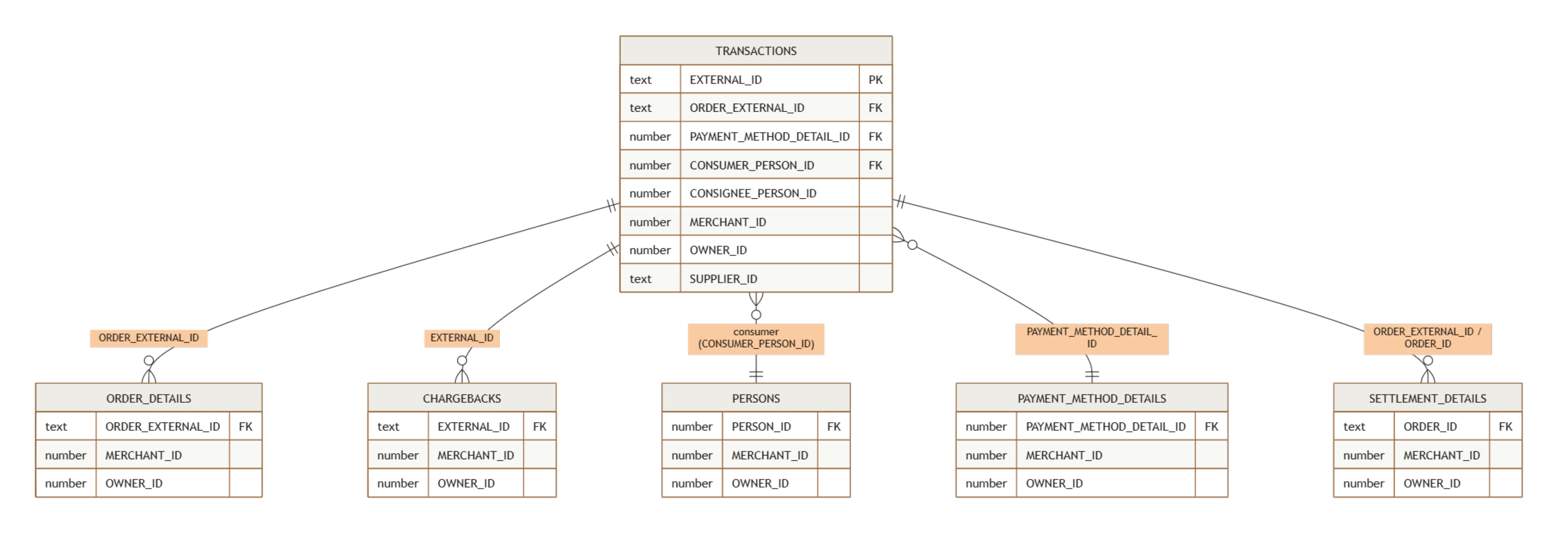
Use the following keys to join the datasets that best suit your needs.
Querying your dataset
Use the following basic SQL queries to extract key data from the six datasets.
All transactions with payment method details
Joins the TRANSACTIONS and PAYMENT_METHOD_DETAILS datasets to show each transaction alongside the card or payment method used, useful for analyzing payment method performance or troubleshooting declines.
SELECT
    t.EXTERNAL_ID,
    t.MERCHANT_NAME,
    t.SELL_AMOUNT,
    t.SELL_CURRENCY,
    t.STATE,
    t.AUTHORIZED_TIMESTAMP,
    p.BIN,
    p.TYPE          AS CARD_TYPE,
    p.ISSUING_COUNTRY
FROM      TRANSACTIONS          t
LEFT JOIN PAYMENT_METHOD_DETAILS p
       ON t.PAYMENT_METHOD_DETAIL_ID = p.PAYMENT_METHOD_DETAIL_ID
WHERE t.STATE = 'Authorized';
Net settlement by order with billing country
Joins the TRANSACTIONS and SETTLEMENT_DETAILS datasets to reconcile what was charged to the consumer against what was settled to the supplier, including fees and FX rate applied.
SELECT
    t.ORDER_EXTERNAL_ID,
    t.MERCHANT_ORDER_ID,
    t.BILLING_COUNTRY_CODE,
    t.SELL_CURRENCY,
    t.SELL_AMOUNT,
    s.NET_AMOUNT,
    s.SETTLEMENT_CURRENCY,
    s.SETTLEMENT_DATE
FROM      TRANSACTIONS     t
LEFT JOIN SETTLEMENT_DETAILS s
       ON t.ORDER_EXTERNAL_ID = s.ORDER_ID
WHERE s.LINE_TYPE = 'Sale';
Disputed transactions with consumer billing details
Joins the TRANSACTIONS, CHARGEBACKS and PERSONS datasets to surface the consumer's billing details for any disputed transaction, useful for fraud investigation or chargeback response preparation.
SELECT
    t.EXTERNAL_ID,
    t.MERCHANT_NAME,
    t.SELL_AMOUNT,
    t.SELL_CURRENCY,
    cb.CB_DATE,
    cb.CHARGEBACK_REASON,
    cb.CHARGEBACK_AMOUNT,
    cb.WON_OR_LOST,
    per.BILLING_NAME,
    per.BILLING_COUNTRY
FROM      TRANSACTIONS t
JOIN      CHARGEBACKS  cb  ON t.EXTERNAL_ID         = cb.EXTERNAL_ID
LEFT JOIN PERSONS      per ON t.CONSUMER_PERSON_ID  = per.PERSON_ID;
Order line items for a specific order
Joins the TRANSACTIONS and ORDER_DETAILS datasets to break down an order into its individual SKUs, quantities, and prices, useful for reconciling order-level data against line-item detail.
SELECT
    t.ORDER_EXTERNAL_ID,
    t.MERCHANT_ORDER_ID,
    od.MERCHANT_SKU,
    od.QUANTITY,
    od.CONSUMER_PRICE,
    od.CONSUMER_CURRENCY
FROM      TRANSACTIONS  t
JOIN      ORDER_DETAILS od
       ON t.ORDER_EXTERNAL_ID = od.ORDER_EXTERNAL_ID
WHERE t.MERCHANT_ORDER_ID = '<your-order-id>';contact your Reach representative or our support team at [email protected].
Updated 3 months ago