
Cash App Pay

Cash App Pay is a digital wallet available to customers in the United States for making online payments.
Enables online and in-app purchases using stored funds or with a connected credit card, debit card, or bank account.
Cash App Pay payment flow
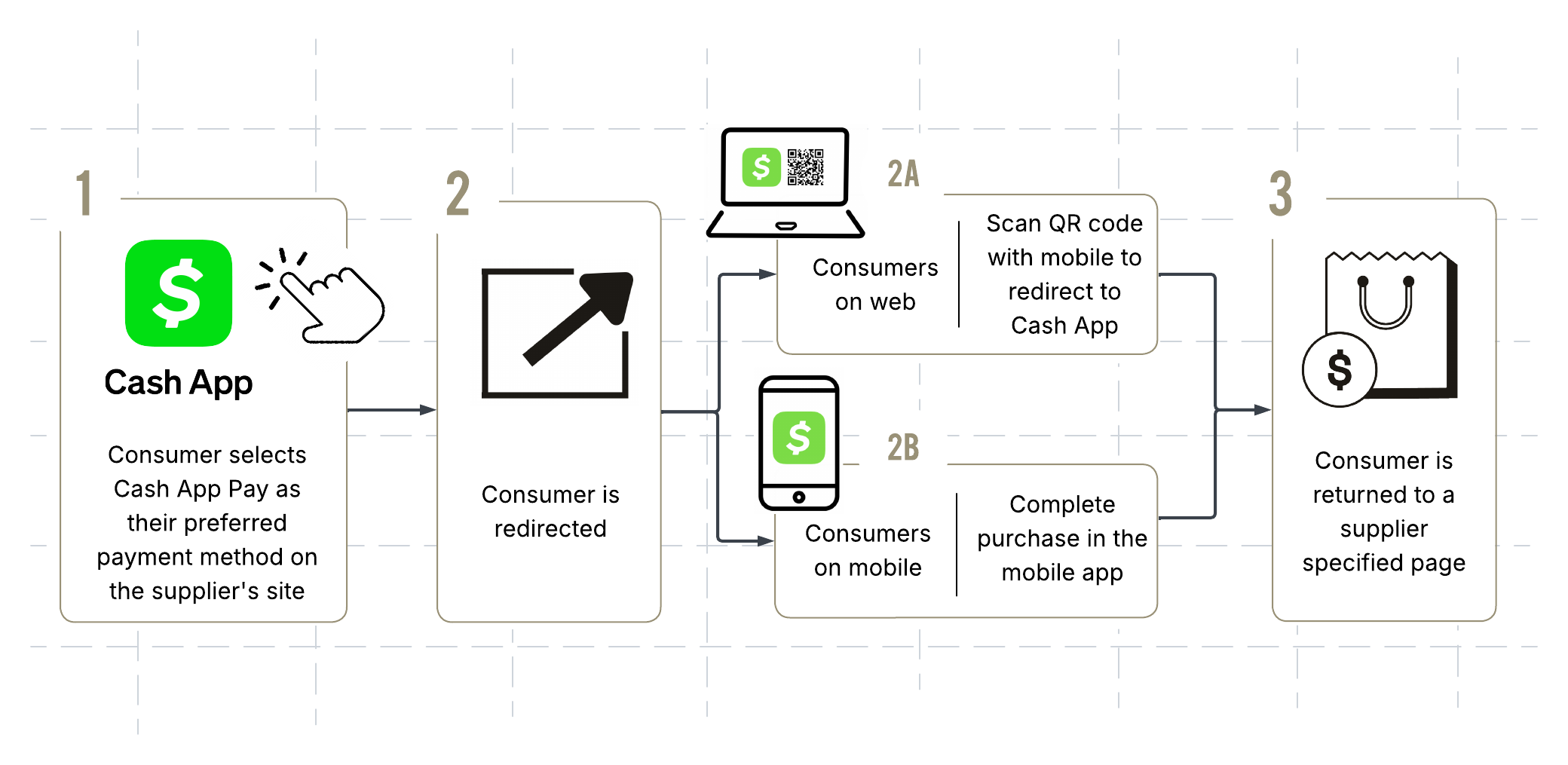
The Cash App Pay payment flow begins when the consumer selects Cash App Pay as their preferred payment method. The supplier creates an order with a/checkout request and provides Cash App Pay as the value in the paymentMethod field.
A redirect URL is returned and displayed to the customer to complete authentication. Depending on the consumer's shopping method, the redirect URL will look different:
- On mobile: If the consumer is on a mobile device, they will be directed to complete authentication in Cash App. If they do not have the mobile app, they will be instructed to download it.
- On web browser: If the consumer is on a desktop, they will be redirected to a page containing a QR code. The consumer must scan the QR code to complete authentication in Cash App.
Cash App is only available for download in the United States.
After completing the purchase in the app, the consumer is redirected to a supplier-specified page for payment confirmation.
Properties
Cash App Pay has many of the same features as other digital wallets. Review the payment method's supported countries, currencies, and features below:
Capture of an amount less the than original authorization is supported, however only a single partial payment is supported at this time.
Both partial and full refunds are supported. The refund period is 90 days.
Cash App Pay and the Checkout API
Use the /checkout endpoint to create an order in Reach's system and attempt payment authorization.
To create a Cash App Pay transaction, set the PaymentMethod field to CASHAPP and provide all required information.
No additional integration work is required beyond what is already in place for redirect payment methods such as iDeal and PayPal. For further details, see the Checkout API page.
The tabs below show an example of a /checkout request using Cash App Pay as the payment method and the corresponding response.
POST https://checkout.rch.io/v2.21
{
  "MerchantId": "ee54106f-30b8-45df-b62f-b649fc80eafd",
  "ReferenceId": "1621468436723",
  "ConsumerCurrency": "USD",
  "PaymentMethod": "CASHAPPP",
  "Capture": false,
  "Items": [
    {
      "Description": "Item",
      "ConsumerPrice": 100,
      "Quantity": 1,
      "Sku": "4383471583721",
      "ImageUrl": "test.jpg"
    }
  ],
  "Consumer": {
    "Name": "First Last",
    "Email": "[email protected]",
    "Phone": "3337678899",
    "Address": "223 Elm Tree",
    "City": "Place",
    "Region": "Hamburg",
    "PostalCode": "20",
    "Country": "US"
  },
  "DeviceFingerprint": "c41487d2-6654-4d6a-8e55-2f3d92b285f8",
  "StashId": null,
  "Return": "https://checkout.rch.red/return.php"
}
{
"OrderId": "c29173aa-dffb-400e-8a03-0a6636e77719",
"UnderReview": false,
"Expiry": "2027-05-21T23:54:02Z",
"Authorized": false,
"Completed": false,
"Captured": false,
"Action": {
"Redirect": "https://supplierwebsite/success"
}
}The consumer's billing address must be located in the United States for a successful request.
Profile name
During the redirect, the consumer's $cashtag—their unique identifier on Cash App—is automatically displayed on the redirect page.
This provides an additional level of verification and confirms to the consumer that the correct Cash App account is being utilized, reducing confusion and limiting friendly fraud.
Testing
Cash App provides magic values to test various payment scenarios. Use the Reach API sandbox integration to submit a magic value and review the expected response and transaction outcomes.
The Cash App's Developer Sandbox page provides a complete list of magic values, though the values available for testing with Reach are limited.
Additional resources
Cash App provides an availability dashboard where suppliers can verify Cash App's status, review historical uptime, and confirm incidents.
contact your Reach representative or our support team at [email protected].
Updated about 1 month ago